Are you looking to enhance your television’s audio without investing in a traditional soundbar? You might already have a powerful audio device in your home: a smart speaker. From the early days of Amazon Echo to the sophisticated Google Home and other innovative lines, smart speakers have transformed how we interact with technology. While primarily known for voice assistance and music playback, many users wonder if these versatile gadgets can double as a TV soundbar. This guide will explore the possibilities, benefits, limitations, and best practices for integrating your smart speaker with your television to transform your home entertainment experience.
Understanding Smart Speakers and Their Role in TV Audio
A smart speaker is an internet-connected device with an integrated virtual assistant, such as Amazon Alexa, Google Assistant, or Apple Siri. These speakers leverage artificial intelligence to respond to voice commands, play music, control smart home devices, provide information, and much more. Their primary function has traditionally revolved around auditory interactions and music streaming, often delivering richer sound than basic device speakers. The rapid evolution of smart speaker technology means many models now boast impressive audio capabilities, leading users to consider them for broader applications, including improving TV sound.
The history of smart speakers began with simple voice assistants and evolved to include multi-room audio, advanced sound processing, and integration into larger smart home ecosystems. Key players like Amazon, Google, and Apple have dominated the market, continuously pushing the boundaries of what these devices can do. Other brands like Sonos and Bose have also made significant strides, often focusing on premium audio quality alongside smart functionalities.
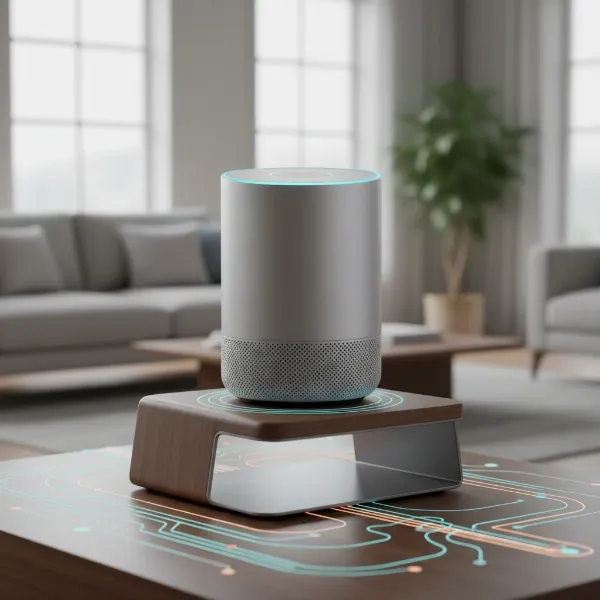 A visual representation of a smart speaker evolving from basic voice assistant to a comprehensive home hub.
Compatibility and Connectivity: Bridging Your Smart Speaker to Your TV
Connecting a smart speaker to your TV isn’t always a straightforward “plug-and-play” process, as compatibility varies significantly. The method you choose depends on both your TV and smart speaker’s capabilities.
Smart Speakers with Voice Assistants (Google Assistant, Alexa, Siri):
These are the most common types and offer the most potential for TV integration, especially for voice control. Many modern smart TVs, particularly models from LG and Sony, may have dedicated apps or built-in support for assistants like Alexa, allowing for more seamless pairing via your Wi-Fi network. For non-smart TVs, devices like an Amazon Fire TV Stick paired with an Echo Dot can introduce voice command capabilities and stream audio.
Connectivity Options:
- HDMI ARC/eARC (Audio Return Channel): This is the most recommended connection method for optimal audio quality and control. HDMI ARC allows a single HDMI cable to transmit audio from your TV to your smart speaker (if it has an HDMI ARC input) and enables features like CEC (Consumer Electronics Control), which lets your TV remote control the speaker’s volume. eARC is an enhanced version that supports higher-bandwidth audio formats like Dolby Atmos.
- Optical Audio (TOSLINK): If your TV or smart speaker lacks HDMI ARC, an optical cable is an excellent alternative for digital audio transmission. This connection typically provides better sound quality than analog options.
- Bluetooth: Many smart speakers and modern TVs support Bluetooth, offering a wireless connection. Simply enable Bluetooth on both devices and pair them through your TV’s settings. Be aware that Bluetooth can sometimes introduce latency or audio lag, which can be disruptive during video playback. For TVs without built-in Bluetooth, a Bluetooth transmitter can be used.
- RCA/3.5mm Analog: These older, wired connections are simple but offer basic audio quality. You’ll need to check if your smart speaker has an auxiliary input and your TV has corresponding audio output jacks.
- Wi-Fi (Ecosystem Specific): Some smart speaker systems, notably Sonos, excel in multi-room audio via Wi-Fi. Certain Sonos smart speakers can be paired with Sonos soundbars (like the Beam or Arc) to create a unified home theater system, leveraging Wi-Fi for superior audio synchronization and quality.
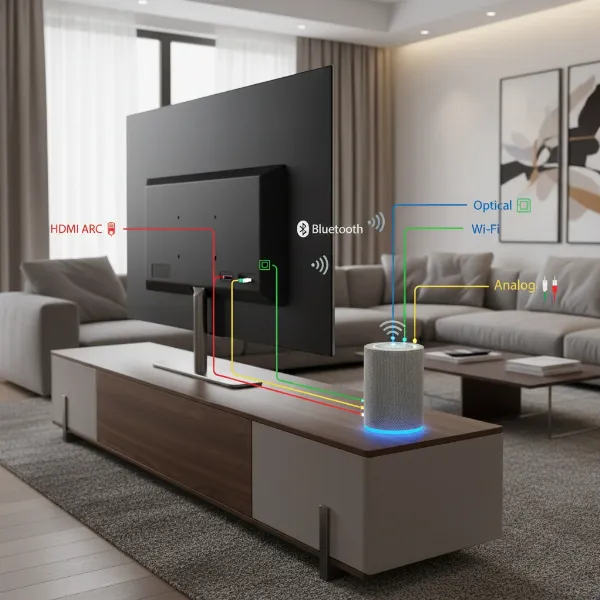 Illustrating various connectivity methods for smart speakers and TVs, including wired and wireless options.
The Reality of Using Smart Speakers as TV Soundbars
While the idea of using a smart speaker to boost your TV’s audio is appealing, it comes with both advantages and notable limitations.
On the positive side, integrating a smart speaker can add convenient voice control to your television, allowing you to change channels, adjust volume, or launch apps with simple commands. If you already own a smart speaker, it can be a cost-effective way to get better sound than your TV’s built-in speakers without buying a new device. Moreover, some smart speakers offer features like multi-room audio, extending your TV sound to other areas of your home.
However, a critical consideration is sound quality. While smart speakers have improved, most are not designed to deliver the rich, expansive, and immersive audio experience of a dedicated soundbar or home theater system. Soundbars typically feature multiple drivers, dedicated subwoofers, and advanced audio processing (like Dolby Atmos or DTS:X) that smart speakers often lack. “If your sole objective is to improve the audio quality of your TV, it’s better to invest in a sound bar or even home theatre system,” advises one expert.
Another significant drawback is audio latency or lag. This is a common issue, especially with Bluetooth connections, where there’s a noticeable delay between the on-screen video and the audio you hear, which can severely impact your viewing pleasure. While some smart TVs and speakers offer “Time Synchronization” features to mitigate this, it’s not always a perfect solution.
Finally, integrating smart speakers with your TV for voice commands can sometimes be problematic. When the TV volume is high, the smart speaker may struggle to hear your commands for other smart home functions. This can lead to a less seamless experience, requiring you to pause or lower the TV volume to issue instructions.
Choosing the Right Smart Speaker Setup for Your TV
Selecting the ideal smart speaker solution for your television hinges on understanding your primary goals and existing setup. Are you looking for basic audio improvement, robust voice control, or a truly immersive cinematic experience?
1. Determine Your Usage Needs:
First, clarify why you want to connect a smart speaker to your TV. Do you primarily want to improve dialogue clarity for daily TV shows? Do you seek hands-free voice control for your entertainment system? Or are you hoping for a more dynamic audio experience for movies and gaming? If your priority is just basic sound enhancement, a simple Bluetooth connection might suffice. However, for serious home theater enthusiasts, a dedicated smart soundbar or a smart speaker system designed for TV audio integration (like Sonos) will offer superior performance. Your budget also plays a crucial role; while a standalone smart speaker might be cheaper, a quality smart soundbar often provides better value for audio fidelity.
2. Compare Brands and Models:
Research brands known for both smart features and audio quality. Amazon Echo devices and Google Nest speakers are excellent for voice control and basic audio. Apple HomePods offer premium sound within the Apple ecosystem. For a more serious audio upgrade that integrates smart features, consider hybrid devices like the Bose Smart Soundbar 600, which functions as both a smart speaker and a high-fidelity soundbar, or Sonos speakers that can wirelessly connect to Sonos soundbars for a surround sound setup. Look for detailed reviews and comparisons focusing on TV audio performance, not just music playback.
3. Essential Factors to Consider:
- Sound Quality: This is paramount. Look for models with clear dialogue, decent bass response, and good overall soundstaging. Many smart speakers have improved, but dedicated soundbars typically outperform them for TV audio.
- Connectivity Options: Prioritize HDMI ARC/eARC for the best experience, as it ensures proper audio synchronization and control. Optical audio is a good alternative. Bluetooth is convenient but can introduce latency.
- Smart Features & Voice Assistant Integration: How well does the smart speaker’s voice assistant integrate with your TV? Can it control basic TV functions? Does it support the smart home ecosystem you already use?
- Latency: Investigate user reviews for any reported audio lag, especially with wireless connections. Some brands actively address this with proprietary technologies.
- Design and Durability: Consider how the speaker fits into your living space and its build quality.
- Price: Balance your budget with your desired audio quality and features. Sometimes, investing slightly more in a smart soundbar provides a significantly better TV audio experience than trying to force a general-purpose smart speaker into the role.
Top Smart Speakers and Smart Soundbars for Enhanced TV Audio
When looking to integrate smart speaker functionality with your TV audio, certain devices stand out. This table highlights popular options, combining the best of both worlds or offering solid integration possibilities.
| Model | Advantages | Disadvantages | Estimated Price Range |
|---|---|---|---|
| Sonos Beam (Gen 2) | Excellent sound for its size, Dolby Atmos, integrated voice assistants (Alexa, Google Assistant), seamless Sonos ecosystem integration. | Requires Sonos ecosystem for full multi-room benefits, premium pricing. | $400 – $500 |
| Bose Smart Soundbar 600 | Impressive Dolby Atmos, rich bass, integrated Alexa and Google Assistant, compact design. | Can be pricey, best performance often requires additional Bose sub/surrounds. | $400 – $550 |
| JBL Authentics 500 | Premium sound, Dolby Atmos, dual voice assistants (Alexa, Google Assistant), room calibration, stylish design. | Larger footprint, higher price point for a standalone smart speaker, less direct TV integration than dedicated soundbars. | $600 – $700 |
| Amazon Echo Studio | Spatial audio (3D audio), built-in Zigbee hub, good bass for a smart speaker, Alexa integration. | Can experience latency with some TV setups, sound quality not on par with dedicated soundbars for TV. | $150 – $200 |
| Apple HomePod (2nd Generation) | Rich, detailed sound, excellent Siri integration, room-sensing audio, ideal for Apple ecosystem users. | Only works well within Apple ecosystem, limited third-party app support, no direct HDMI TV input. | $250 – $350 |
Optimizing Your Smart Speaker TV Audio Experience
Once you’ve connected your smart speaker to your TV, a few simple tips can help you get the most out of your setup and mitigate common issues.
Firstly, strategic placement of your smart speaker is crucial. Position it in front of your TV, ideally centered, to ensure the sound travels directly to your listening area. Avoid placing it in enclosed spaces or too close to walls, which can muffle sound or create unwanted echoes. Proper placement also helps the voice assistant’s microphones pick up your commands more clearly.
Secondly, regular software updates are vital. Manufacturers frequently release updates that improve audio performance, enhance connectivity, and address latency issues. Ensure both your smart speaker and smart TV are running the latest firmware to benefit from these improvements. Enable automatic updates if available.
To minimize voice command interference, consider adjusting the TV’s audio output settings. Some TVs allow you to lower the internal speaker volume while still outputting sound to an external device, or even turn off the internal speakers entirely. This prevents the TV’s sound from competing with your voice, allowing the smart speaker’s assistant to hear you more accurately. If latency is an issue, explore your TV’s audio settings for features like “audio delay” or “lip-sync adjustment” to fine-tune the synchronization between video and sound. Using an HDMI ARC connection typically offers the best control over these settings.
“For the ultimate fusion of smart control and superior TV sound, dedicated smart soundbars often bridge the gap more effectively than standalone smart speakers, providing both voice assistant capabilities and true cinematic audio performance,” says Alex Chen, Smart Home Audio Specialist.
Conclusion
Integrating your smart speaker with your television can certainly elevate your entertainment experience, offering the convenience of voice control and an immediate improvement over your TV’s built-in speakers. While general-purpose smart speakers may fall short of dedicated soundbars in terms of pure audio fidelity and immersive cinematic effects, they provide a valuable stepping stone for many users. Understanding the various connection methods—from HDMI ARC to Bluetooth—and recognizing the limitations of latency and voice command interference are key to a successful setup. Ultimately, whether you opt for a standalone smart speaker or invest in a smart soundbar, the goal is to create a more engaging and interactive home viewing environment. What smart speaker setup will you choose to transform your TV audio today?
Frequently Asked Questions
Can any smart speaker be used as a TV soundbar?
Not all smart speakers are ideal for TV audio. While many can connect via Bluetooth or aux, dedicated smart soundbars or specific smart speakers designed for TV integration (e.g., Sonos, Bose Smart Soundbar series) offer superior sound quality, connectivity options like HDMI ARC, and better synchronization for a true home theater experience.
What causes audio lag when using a smart speaker with a TV?
Audio lag, or latency, often occurs with wireless connections like Bluetooth due to the processing time required to transmit and decode audio signals. Digital-to-analog conversion and network delays can also contribute. Using HDMI ARC or eARC connections typically minimizes this issue by providing a more direct and synchronized audio path.
Will a smart speaker improve my TV’s sound significantly?
A smart speaker will almost always offer better sound than a TV’s internal speakers, which are often limited by thin designs. You can expect clearer dialogue and richer sound. However, for deep bass, immersive surround sound, or high-fidelity audio, a dedicated soundbar or home theater system will provide a more substantial upgrade.
Can I control my TV with my smart speaker’s voice assistant?
Yes, many smart speakers can control compatible smart TVs or TV streaming devices (like Fire TV Stick) through their built-in voice assistants. This allows you to perform actions such as adjusting volume, changing channels, or launching apps with voice commands, enhancing convenience in your smart home setup.
What’s the difference between a smart speaker and a smart soundbar?
A Smart Speaker is a standalone device primarily for voice commands, music, and smart home control, often with decent audio. A smart soundbar is a speaker system designed specifically for TV audio, featuring multiple drivers for clear dialogue and robust sound, while also integrating smart assistant capabilities like voice control. Smart soundbars generally offer superior TV audio performance.