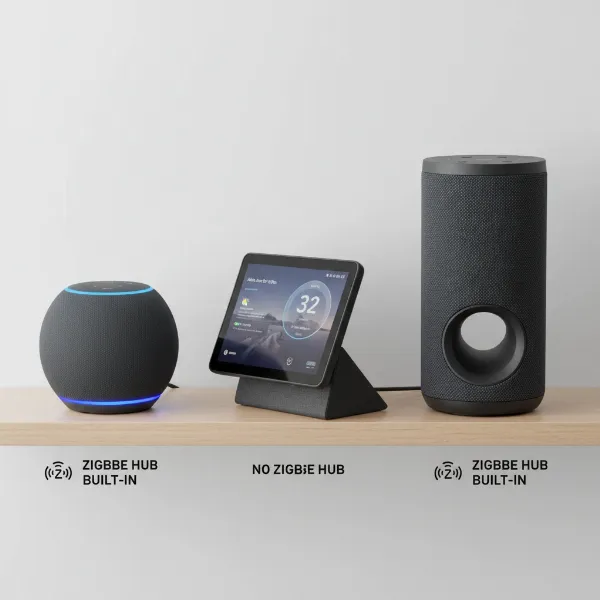
Imagine a smart speaker that knows your voice, understands your preferences, and delivers a truly personalized experience. This isn’t science fiction; it’s the reality of voice profiles on today’s smart speakers. From Amazon Alexa to Google Assistant, these intelligent devices are designed not just to understand what you say, but also who is speaking, transforming how we interact with our smart homes. This article will delve into the fascinating technology behind voice recognition, explore the compelling benefits of setting up voice profiles, and provide a clear, step-by-step guide to get you started.
The Science Behind Voice Recognition: How Smart Speakers Hear You
At its core, a voice profile is a digital fingerprint of your unique voice. Unlike speech recognition, which focuses on deciphering the words you utter, voice recognition is specifically engineered to identify the individual speaker. This distinction is crucial for personalized interactions.
The Technology at Play
Smart speakers employ a sophisticated array of technologies to achieve this remarkable feat:
- Microphone Arrays and Noise Cancellation: Smart speakers are equipped with multiple microphones that work together, much like human ears, to pinpoint the direction of a sound. Advanced noise-cancelling software and echo cancellation allow the device to filter out background noise – whether it’s music playing, a TV show, or other conversations – and focus intently on the primary speaker.
- Far-field Voice Recognition: This technology enables your smart speaker to hear and understand you from across a room, even when you’re not standing directly next to it. It utilizes techniques like speaker localization, which determines where your voice is coming from, and beamforming, which directs the microphone’s sensitivity towards your voice, effectively creating an acoustic “beam” to capture your speech clearly.
- Artificial Intelligence (AI) and Machine Learning: When you speak, your voice is digitized and sent to the cloud for processing (though increasingly, some initial processing occurs on the device for speed and privacy). Here, AI and machine learning algorithms analyze your unique “voiceprint” – a combination of pitch, frequency, tone, and speaking patterns. Natural Language Processing (NLP) then helps the assistant understand the meaning and intent behind your words, regardless of accents or speech variations. Over time, through continuous interaction, the AI learns and refines its understanding of your voice, becoming more accurate and personalized.
- Automatic Speaker Recognition (ASR): This is the overarching field that encompasses the identification and verification of speakers. Methods like audio fingerprinting involve extracting a distinctive identifier from your voice signal, creating a spectrogram that can be compared against a database of registered voices.
|
Our Picks for the Best Smart Speaker in 2026
As an Amazon Associate I earn from qualifying purchases.
|
||
| Num | Product | Action |
|---|---|---|
| 1 | Portable Bluetooth Speaker Valentines Gifts For Him: Powerful Crystal Clear Sound/Romantic Light/IPX5 Waterproof/All Day Playtime/BT 5.3/TWS Paring,Small Wireless Speaker for Outdoor-Travel-Date Night |

|
| 2 | Sonos Era 100 - White - Wireless, Alexa Enabled Smart Speaker |
|
| 3 | Bluetooth Speaker with HD Sound, Portable Wireless, IPX5 Waterproof, Up to 20H Playtime, TWS Pairing, BT5.3, for Home/Party/Outdoor/Beach, Electronic Gadgets, Birthday Gift (Black) |
|
| 4 | Google Audio Bluetooth Speaker - Wireless Music Streaming, Powerful Sound, Assistant Built-in, Wi-Fi and Bluetooth Connectivity, Smart Home Control, Stereo Pairing - Chalk |
|
| 5 | Mini Bluetooth Speaker, Smart Wireless Portable Speaker with Touchscreen, Loud HD Sound, LED Lights, BT5.4, All In One Small Audio for Home/Outdoor/Travel/Shower/Party/Beach/Camping/Hiking/Cycling |
|
| 6 | Sony SRS-XB100 Wireless Bluetooth Portable Lightweight Super-Compact Travel Speaker, Durable IP67 Waterproof & Dustproof Shower Speaker, 16 Hour Battery, Versatile Strap, & Hands-free Calling, Black |
|
| 7 | WiiM Sound Lite Smart Speaker, Hi‑Res 24‑bit/192 kHz, AI RoomFit™ Room Correction, 100W Peak, Wi‑Fi 6E/Bluetooth 5.3, Multi‑Room & Stereo Pairing, Black |
|
| 8 | Bluetooth Speaker with HD Sound and Lights, Portable Wireless, Long-lasting battery life, TWS Pairing, for Home/Party/Outdoor/Travel/Beach, Stocking Stuffers, White Elephant Gifts for Adults (Black) |
|
| 9 | Belkin SOUNDFORM Elite Hi-Fi Smart Speaker + Wireless Charger (Alexa Voice-Controlled Bluetooth Speaker) Sound Technology By Devialet, Fast Wireless Charging for iPhone, Samsung Galaxy & More - White |
|
| 10 | aowoka Bluetooth Speaker, 2025 Portable Wireless Speakers with Led Light, Bluetooth 5.4, 24H Playtime, Enhanced Bass, IPX7 Waterproof, Outdoor Speaker for Travel, Sport, Party, Biking. |
|
Why Set Up Voice Profiles? The Benefits of Personalization
Setting up voice profiles goes beyond a mere tech novelty; it unlocks a layer of personalization that significantly enhances your smart speaker experience.
- Tailored Information and Content: With a voice profile, your smart speaker can access your individual calendar, specific music playlists, preferred news briefings, and even your unique shopping lists. Ask for “my day,” and it will deliver information relevant only to you, not everyone in the household.
- Personalized Communication: Imagine telling your smart speaker to “send Mom a message.” Without a voice profile, it might ask “Which Mom?” or send it to the wrong contact. With a voice profile, it knows exactly who “Mom” is in your contacts, streamlining communication.
- Age-Appropriate Content and Parental Controls: For families, voice profiles are invaluable. Children can have their own profiles, allowing the smart speaker to deliver age-appropriate content, respond with kid-friendly answers, and restrict access to certain features or purchases, offering peace of mind for parents.
- Seamless Multi-User Households: In a home with multiple residents, voice profiles eliminate confusion. Each person receives personalized responses without needing to specify “for John” or “for Sarah.” This creates a hands-free, intuitive environment where everyone feels heard and catered to.
- Enhanced Security and Convenience: Voice profiles add a layer of security, as certain sensitive actions (like making purchases or accessing personal information) can be restricted to recognized voices. This means less fumbling with phones and more natural, conversational interactions with your smart devices.
“Voice profiles are more than just a convenience; they’re the bridge between a generic smart device and a truly personal digital assistant, making technology adapt to us, rather than the other way around.”
Step-by-Step Guide: Setting Up Voice Profiles
Setting up a voice profile is a straightforward process, typically managed through the accompanying mobile application for your smart speaker.
For Amazon Alexa Devices
- Open the Alexa App: Launch the Amazon Alexa app on your smartphone or tablet.
- Navigate to Settings: Tap the “More” tab (usually a three-line icon or “More” at the bottom right), then select “Settings.”
- Access Your Profile: Scroll down and tap “Your Profile,” then select “Voice” or “Voice ID.”
- Add Your Voice: Tap “Create” or “Add Your Voice.” You’ll be presented with privacy details; review them and tap “Consent” or “Agree” if you accept.
- Follow Prompts: The app will ask you to read a series of phrases aloud. Speak clearly and naturally. This helps Alexa learn the unique characteristics of your voice.
- Complete Setup: Once you’ve read all the phrases, tap “Done.” Your voice profile is now active.
- Adding Family Members: To add other family members, they should download the Alexa app, sign in with the same Amazon account linked to the Alexa device, and when prompted, select “I’m someone else” or choose their name from a list if already added. Then, they will follow steps 3-6 to set up their own voice profile.
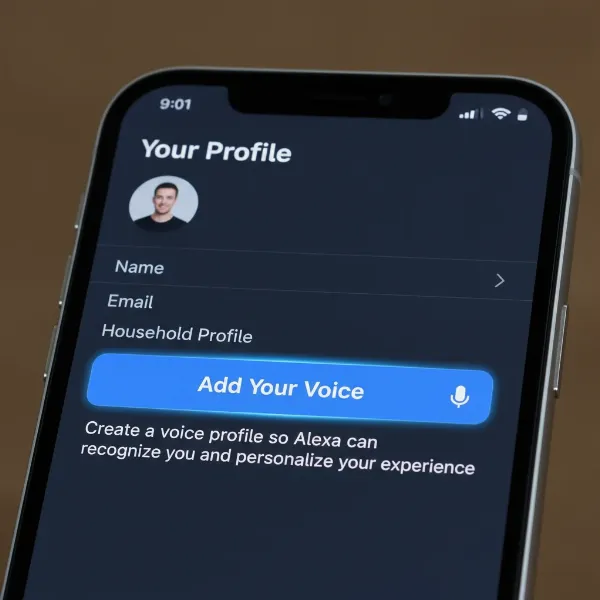 A smartphone screen showing the Alexa app with "Add Your Voice" option highlighted, symbolizing the setup of voice profiles on smart speakers.
For Google Assistant Devices
- Open the Google Home App: Launch the Google Home app on your smartphone or tablet.
- Access Assistant Settings: Tap on your profile avatar/icon in the top right corner (or the “Settings” tab at the bottom, then “Assistant settings” or “Google Assistant”).
- Select Voice Match: Tap “Voice Match.”
- Enable Hey Google: Ensure the “Hey Google” feature is toggled on. This allows the Assistant to respond hands-free.
- Set Up or Retrain: Tap “Teach your Assistant your voice again” or “Set up Voice Match” if it’s your first time.
- Follow Prompts: The app will guide you through a series of prompts, typically asking you to say “Hey Google” and “Ok Google” multiple times. Speak clearly and consistently.
- Complete Setup: Once the training is complete, your Google Assistant will now be able to recognize your voice.
- Inviting Others: To invite other household members, look for an “Invite others” option within the Voice Match settings or ensure they are part of your Google Family Group and follow similar steps on their own devices.
Optimizing Your Voice Profile Experience
To ensure your smart speaker consistently recognizes your voice and provides the best personalized experience:
- Speak Clearly: During the initial setup, speak as naturally as possible, but ensure clarity. Avoid mumbling or shouting.
- Retrain if Necessary: If your smart speaker struggles to recognize your voice, especially after a period of time or if your voice changes (e.g., due to a cold), retrain your voice model. Both Alexa and Google Assistant apps offer this option within their Voice Match/Voice ID settings.
- Consider Speaker Placement: While far-field recognition is powerful, placing your smart speaker in a central location, away from constant background noise, can improve its ability to distinguish voices.
- Review Privacy Settings: Familiarize yourself with the privacy settings related to voice data in your Alexa or Google Home app. You often have control over how your voice recordings are used and whether they are stored.
Evolution and Future of Voice Recognition
Voice recognition technology continues to advance rapidly. Recent developments include more sophisticated on-device processing, reducing reliance on cloud servers for faster responses and enhanced privacy. As AI and machine learning become more refined, we can expect even greater accuracy, better natural language understanding, and more seamless integration into our daily lives. The future promises smart speakers that not only recognize who is speaking but also infer emotional states or context with even greater precision.
Conclusion
Setting up voice profiles on your smart speaker is a simple yet powerful way to unlock a truly personalized and convenient smart home experience. By leveraging sophisticated voice recognition technology, your Amazon Alexa or Google Assistant device can differentiate between household members, delivering tailored information, communication, and content that caters specifically to you. Taking a few minutes to configure this feature transforms your smart speaker from a generic assistant into a truly personal companion, making daily interactions more intuitive and efficient. Have you explored the full potential of your Smart Speaker by setting up individual voice profiles yet?