Have you ever found yourself tiptoeing around in the dark, needing to ask Alexa a quick question, only for her response to boom through your quiet home, potentially waking everyone up? It’s a common scenario for many smart speaker users. Thankfully, Amazon’s Alexa offers a clever solution: Whisper Mode. This innovative feature ensures your smart assistant can match your hushed tones, providing a more considerate and discreet interaction, especially during those late-night hours. Understanding how to enable and effectively use Alexa’s Whisper Mode can significantly enhance your smart home experience, allowing for seamless control without disturbing the peace.
Understanding Alexa’s Whisper Mode
What is Smart Speaker Whisper Mode?
|
Our Picks for the Best Smart Speaker in 2026
As an Amazon Associate I earn from qualifying purchases.
|
||
| Num | Product | Action |
|---|---|---|
| 1 | Sonos Era 100 - White - Wireless, Alexa Enabled Smart Speaker |

|
| 2 | Sony SRS-XB100 Wireless Bluetooth Portable Lightweight Super-Compact Travel Speaker, Durable IP67 Waterproof & Dustproof Shower Speaker, 16 Hour Battery, Versatile Strap, & Hands-free Calling, Black |
|
| 3 | Bluetooth Speaker with HD Sound and Lights, Portable Wireless, Long-lasting battery life, TWS Pairing, for Home/Party/Outdoor/Travel/Beach, Stocking Stuffers, White Elephant Gifts for Adults (Black) |
|
| 4 | Portable Bluetooth Speaker Valentines Gifts For Him: Powerful Crystal Clear Sound/Romantic Light/IPX5 Waterproof/All Day Playtime/BT 5.3/TWS Paring,Small Wireless Speaker for Outdoor-Travel-Date Night |
|
| 5 | Google Audio Bluetooth Speaker - Wireless Music Streaming, Powerful Sound, Assistant Built-in, Wi-Fi and Bluetooth Connectivity, Smart Home Control, Stereo Pairing - Chalk |
|
| 6 | aowoka Bluetooth Speaker, 2025 Portable Wireless Speakers with Led Light, Bluetooth 5.4, 24H Playtime, Enhanced Bass, IPX7 Waterproof, Outdoor Speaker for Travel, Sport, Party, Biking. |
|
| 7 | WiiM Sound Lite Smart Speaker, Hi‑Res 24‑bit/192 kHz, AI RoomFit™ Room Correction, 100W Peak, Wi‑Fi 6E/Bluetooth 5.3, Multi‑Room & Stereo Pairing, Black |
|
| 8 | Belkin SOUNDFORM Elite Hi-Fi Smart Speaker + Wireless Charger (Alexa Voice-Controlled Bluetooth Speaker) Sound Technology By Devialet, Fast Wireless Charging for iPhone, Samsung Galaxy & More - White |
|
| 9 | Bluetooth Speaker with HD Sound, Portable Wireless, IPX5 Waterproof, Up to 20H Playtime, TWS Pairing, BT5.3, for Home/Party/Outdoor/Beach, Electronic Gadgets, Birthday Gift (Black) |
|
| 10 | Mini Bluetooth Speaker, Smart Wireless Portable Speaker with Touchscreen, Loud HD Sound, LED Lights, BT5.4, All In One Small Audio for Home/Outdoor/Travel/Shower/Party/Beach/Camping/Hiking/Cycling |
|
Alexa’s Whisper Mode is a unique feature designed to allow your Amazon Echo device to detect when you speak to it in a low, hushed voice. Once detected, Alexa will then respond to your commands or questions in a corresponding whisper. This capability is a testament to the ongoing advancements in voice assistant technology, aiming to make interactions more intuitive and adapted to varying environmental contexts. It’s a subtle yet impactful detail that enhances the personal feel of your smart speaker.
This thoughtful inclusion by Amazon, first introduced in 2018, ensures that your smart speaker is not just functional but also considerate of your surroundings. When enabled, Alexa intelligently processes your whispered input and modulates her own voice to respond softly, guaranteeing an unobtrusive experience. This is particularly valuable in settings where loud sounds could be disruptive.
Why Whisper Mode is Essential for Nighttime Use
Imagine needing to check the time, set a quiet alarm, or adjust smart lights in the middle of the night without waking a sleeping partner, a baby in a nearby nursery, or even just startling yourself. This is precisely where Whisper Mode becomes indispensable. By allowing Alexa to whisper back, you maintain the quiet ambiance of your home, preserving a tranquil environment for everyone. It eliminates the jarring experience of a loud response breaking the silence, making it perfect for bedrooms, shared apartments, or any space where noise sensitivity is a concern.
Tests have even shown the measurable difference in volume. For instance, an Amazon Echo Dot operating at 50% volume might typically respond at around 51 decibels; however, with Whisper Mode activated, the same response can drop to a mere 40 decibels, a significant reduction for a peaceful night.
Activating Whisper Mode: Two Simple Approaches
Enabling Whisper Mode on your Alexa device is straightforward, offering both a quick voice command option and a more detailed setup through the Alexa app. Choose the method that best suits your preference and current situation.
Method 1: Enabling with a Voice Command
The quickest way to activate Whisper Mode is by simply telling Alexa to turn it on. This method is ideal when you’re already near your device and want immediate quiet responses.
To enable Whisper Mode using your voice, just say:
“Alexa, turn on Whisper Mode.”
Alexa will confirm the activation with a whispered response, typically saying, “Whisper Mode is now on.” On some Echo Show devices, you might also notice a subtle purple bar appearing at the bottom of the screen, indicating that the feature is active. Remember, for Alexa to whisper back, you must whisper your commands to her. If you speak normally, she will respond at her usual volume, even with Whisper Mode enabled.
Method 2: Enabling Through the Alexa App
For those who prefer a visual interface or want to manage settings from their smartphone, the Alexa app provides a step-by-step process to enable Whisper Mode. This method ensures the setting is toggled on for all compatible devices linked to your account.
Here’s how to enable Whisper Mode using the Alexa app:
- Open the Alexa App: Launch the Amazon Alexa app on your smartphone or tablet.
- Navigate to Settings: Tap the “More” tab, usually found in the bottom right corner of the app screen.
- Select Settings: From the menu that appears, choose “Settings.”
- Access Voice Responses: Scroll down to the “Alexa Preferences” section and tap on “Voice Responses.”
- Toggle Whisper Mode On: Locate the “Whisper Mode” option and toggle the switch to the “On” position.
Once enabled through the app, your Alexa device will be ready to respond quietly whenever you whisper to it. This provides a convenient way to manage your device settings from anywhere.
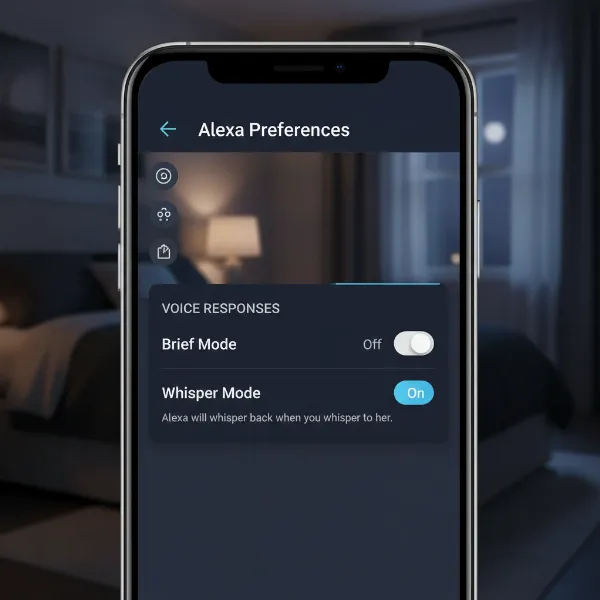 Screenshot of Alexa app settings demonstrating how to enable Whisper Mode for quiet responses at night
Disabling Whisper Mode
Just as easily as you enable Whisper Mode, you can also turn it off when quiet responses are no longer needed. This gives you full control over how your Alexa device interacts with you throughout the day.
To disable Whisper Mode:
- Using Your Voice: Simply say, “Alexa, turn off Whisper Mode.” Alexa will confirm that the feature has been deactivated.
- Through the Alexa App: Follow the same steps as enabling (More > Settings > Alexa Preferences > Voice Responses), but this time, toggle the “Whisper Mode” switch to the “Off” position.
The flexibility to switch Whisper Mode on and off ensures that Alexa’s responsiveness always aligns with your immediate environment and preferences.
Mastering Whisper Mode for Optimal Nighttime Interactions
For Whisper Mode to truly shine in your quiet hours, understanding its core mechanics and how it interacts with other Alexa features is key. It’s not just about turning it on; it’s about using it effectively.
The Crucial Whisper-to-Whisper Interaction
The most important aspect of Whisper Mode is that Alexa will only respond in a whisper if you initiate the interaction by whispering to her. If Whisper Mode is enabled but you speak at your normal volume, Alexa will reply at her normal volume. This design ensures that Alexa’s responses remain appropriate to the context of your speech.
“Whisper Mode is an excellent example of contextual intelligence. Alexa doesn’t just lower her volume arbitrarily; she mirrors your intent, making interactions feel more natural and less intrusive when discretion is needed.” – Sarah Chen, Smart Home Technology Expert
This nuanced behavior makes Whisper Mode particularly effective for private, late-night queries or commands where maintaining quiet is paramount.
Combining with Other Quiet Features
To further refine your quiet Alexa experience, consider pairing Whisper Mode with other helpful settings:
- Brief Mode: This setting causes Alexa to provide shorter responses and often use a chime instead of a full voice response for simple commands like turning off lights. You can enable Brief Mode in the Alexa app under
Settings > Alexa Preferences > Voice Responses. - Do Not Disturb: While not the same as Whisper Mode, Do Not Disturb can prevent your Echo device from making any audible alerts or notifications during specific times, ensuring uninterrupted sleep. This can be scheduled in the Alexa app.
- Follow-Up Mode: Be aware of Follow-Up Mode. If enabled, Alexa continues listening for a short period after responding. If you whisper a command, and then accidentally speak normally before the follow-up window closes, Alexa might respond at full volume. If this becomes an issue, you can disable Follow-Up Mode by saying, “Alexa, disable Follow-Up Mode.”
Can You Schedule Whisper Mode?
Many users wonder if they can schedule Alexa’s Whisper Mode to automatically turn on and off at specific times, such as bedtime and morning. While you can create a routine in the Alexa app to enable Whisper Mode at a set time (e.g., “Alexa, turn on Whisper Mode” as a custom action), it’s important to remember the core functionality: Alexa will still only whisper back if you whisper to her. The routine activates the feature, but not the forced whispered response regardless of your input. This means you still need to whisper your commands even if a routine has turned Whisper Mode on.
To set up a routine for enabling Whisper Mode:
- Open the Alexa app, tap “More,” then “Routines.”
- Tap the “+” icon to create a new routine.
- Set a trigger (e.g., “At Time” for bedtime).
- Add an action: choose “Custom” and type “turn on whisper mode.”
- Save the routine.
This routine can prepare your Alexa for quiet interactions during the night, but the interactive element of whispering remains essential.
Enhancing Your Smart Speaker Experience
Beyond just activating Whisper Mode, a few additional tips can help you achieve the most harmonious and unobtrusive interactions with your Alexa device, especially when silence is golden.
Optimal Placement of Your Smart Speaker
The location of your Amazon Echo can significantly impact its ability to pick up your whispered commands and deliver clear, hushed responses. Place your device within a reasonable distance from your bed or wherever you’re likely to interact with it at night. Avoid placing it behind obstacles that could muffle your voice or Alexa’s responses. A bedside table or a shelf near your sleeping area is often ideal for ensuring clear communication even when whispering.
Regular Software Updates
Keeping your Alexa device’s software up to date is crucial for optimal performance of all its features, including Whisper Mode. Amazon frequently releases updates that can improve voice recognition, response quality, and overall system stability. Ensure your device is connected to Wi-Fi and allows for automatic updates, so you always have access to the latest enhancements and bug fixes. A well-maintained device will consistently provide the best experience, whether it’s for booming music or a gentle whisper.
Thoughtful Volume Management
While Whisper Mode handles quiet responses, it’s still a good practice to manage your smart speaker’s overall volume, especially if you fluctuate between quiet and loud interactions. If you typically keep your Alexa at a high volume for music, remember to lower it manually or incorporate volume adjustments into your routines for different times of the day. This prevents accidental loud responses when Whisper Mode isn’t active or when you speak at a normal tone with the feature on. Consider setting routines that lower the main volume at night and raise it again in the morning, complementing Whisper Mode’s functionality.
Conclusion
Alexa’s Whisper Mode is more than just a novelty; it’s a practical and considerate feature that significantly enhances the utility of your smart speaker, particularly during quiet times. By enabling this mode, either through a simple voice command or the intuitive Alexa app, you gain the ability to interact with your device without disturbing the peace of your home or interrupting the sleep of loved ones. The nuanced interaction, where Alexa mirrors your hushed tones, makes for a truly personalized and unobtrusive experience. Embrace Whisper Mode to transform your late-night smart home interactions into seamless, silent exchanges, proving that even the smartest technology can learn the art of discretion. What other thoughtful features do you wish your Smart Speaker possessed to make your quiet moments even better?
Frequently Asked Questions
How does Alexa know I’m whispering?
Alexa uses advanced speech recognition algorithms that analyze the volume, pitch, and cadence of your voice. When it detects the characteristics of a whispered voice, it automatically triggers the Whisper Mode response, allowing it to reply in a similarly hushed tone.
Can I use Whisper Mode on any Amazon Echo device?
Whisper Mode is a widely available feature and is compatible with most Amazon Echo devices, including the Echo Dot, Echo Show models, and standard Echo speakers. As long as your device has the latest software updates, you should be able to enable and use this feature.
Will Whisper Mode affect Alexa’s ability to hear me?
Generally, no. Alexa is designed with far-field voice recognition, allowing it to hear commands even from a distance. While whispering requires you to be slightly closer or speak a bit more clearly, Alexa should still be able to understand your whispered commands effectively, ensuring a seamless experience.
Does Whisper Mode work with all Alexa commands?
Yes, Whisper Mode is designed to work with virtually all Alexa commands and queries. Whether you’re asking for the weather, setting an alarm, controlling smart home devices, or playing music, Alexa will respond in a whisper, provided you initiate the command by whispering yourself.