Imagine a smart home where every device anticipates your needs, responding seamlessly to your voice or routine. While smart speakers like Amazon Echo and Google Home offer impressive native capabilities, truly personalized automation often requires a bridge to connect disparate systems. This is where IFTTT, a powerful automation platform, comes into play. By understanding and utilizing IFTTT with your smart speaker, you can unlock a new realm of control, convenience, and customizability, transforming your living space into an intelligent environment that works uniquely for you. This comprehensive guide will walk you through the process, from setup to advanced applets, ensuring you get the most out of your smart speaker ecosystem.
What is IFTTT and Why Use It with Your Smart Speaker?
The landscape of smart home technology is vast, with countless devices and services, each often operating within its own ecosystem. This fragmentation can limit true automation, but IFTTT (If This, Then That) offers a robust solution. It acts as a universal translator, enabling your smart speaker to interact with a much wider array of devices and online services than it could natively.
Understanding the “If This, Then That” Principle
At its core, IFTTT is a simple yet powerful automation engine. It operates on logical “Applets,” which are automated routines defined by a “trigger” and an “action.” When the specified “If This” trigger occurs from one service or device, IFTTT automatically executes the designated “Then That” action with another. For instance, “If the weather forecast predicts rain, then send me a notification.” This straightforward logic allows for complex, multi-device interactions without requiring any coding knowledge.
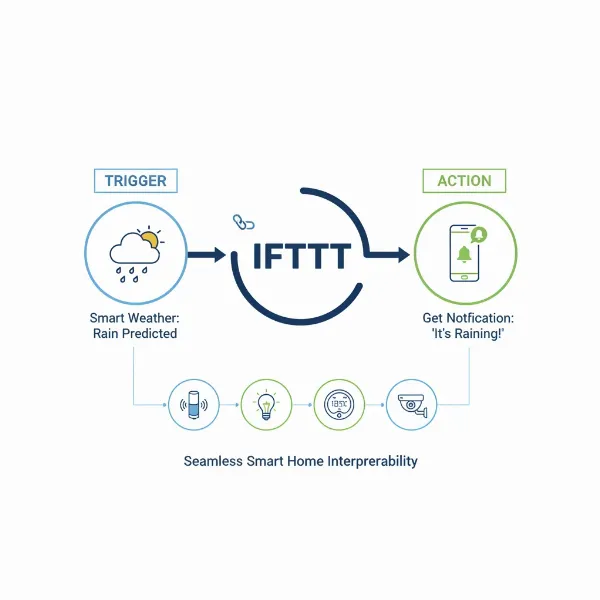 Diagram illustrating IFTTT "If This, Then That" logic with connected smart home devices
Key Benefits of IFTTT for Smart Speaker Users
Integrating IFTTT with your smart speaker significantly enhances its functionality, moving beyond basic commands to create truly intuitive routines. One primary benefit is cross-platform compatibility, allowing your speaker to control devices or services that aren’t natively supported. This means a single voice command can orchestrate actions across various brands, like turning on Philips Hue lights and adjusting a Nest thermostat simultaneously.
Moreover, IFTTT provides unparalleled customization, enabling you to craft bespoke automations tailored to your unique lifestyle. You can set up triggers based on location, time, weather, or even activity on social media. This leads to substantial time savings and workflow streamlining, as routine tasks can be automated, freeing you to focus on more important things. Ultimately, IFTTT helps you build a more responsive, efficient, and personalized smart home experience.
Getting Started: Connecting IFTTT to Your Smart Speaker
Connecting IFTTT to your smart speaker is the crucial first step to unlocking advanced automation. The process is generally straightforward, though there are key differences between Google Assistant and Amazon Alexa due to recent platform changes.
Creating Your IFTTT Account
Before integrating with any smart speaker, you’ll need an IFTTT account. Visit the IFTTT website (ifttt.com) or download the IFTTT app on your smartphone (available for iOS and Android). The signup process is quick and typically involves providing an email address and creating a password, or using a single sign-on option like Google or Facebook. Once your account is set up, you’re ready to start linking your services.
Connecting with Google Assistant (Google Home/Nest)
Connecting IFTTT with Google Assistant, found in Google Home and Nest speakers, is a relatively seamless process. You’ll typically link the accounts through the Google Home app on your smartphone or tablet.
- Open the Google Home app on your mobile device.
- Tap on the “+” icon (or “Devices”) and then select “Works with Google Home.”
- Search for “IFTTT” in the list of available services and select it.
- You will be prompted to sign in to your IFTTT account and authorize Google Assistant to access it. Ensure you use the same Google account that is linked to your smart speaker.
- Once linked, you can start creating or enabling Applets directly within the IFTTT app or website, using Google Assistant as a trigger or action. Google Assistant allows for more natural voice commands, often without a special prefix, and you can even set up to three different phrases for a single Applet.
Connecting with Amazon Alexa (Echo Devices)
It’s important to note that Amazon Alexa’s native integration with IFTTT underwent a significant change, with native support discontinued in October 2023. However, this doesn’t mean IFTTT is off-limits for Alexa users; it simply requires a slightly different approach, often involving third-party services.
To link IFTTT Applets with Alexa routines, you can utilize services like Alexa Voice Monkey, Notify My Echo, or Virtual Buttons. These services act as intermediaries, allowing IFTTT to trigger custom Alexa routines.
- Set up a third-party service like Alexa Voice Monkey (you’ll typically need to enable a skill in the Alexa app and create a virtual device).
- Open the IFTTT app or website and create a new Applet.
- For the “If This” trigger, select your desired event (e.g., a specific time, a smart sensor activation).
- For the “Then That” action, search for and select the Alexa Voice Monkey service (or similar third-party service). Choose an action like “Trigger Monkey (routine)” and select the virtual device you created.
- Finally, create an Alexa Routine in your Alexa app that is triggered by the activation of that virtual device, which in turn performs your desired actions. While it adds a step, this method effectively restores much of the IFTTT functionality for Alexa users.
Unleashing Potential: Popular IFTTT Applets for Smart Speakers
The true magic of IFTTT lies in its ability to connect various services and devices, enabling a myriad of automations that enhance your smart speaker’s capabilities. From simplifying daily chores to boosting your entertainment, IFTTT Applets can transform your home.
Everyday Convenience
Imagine starting your day with perfectly brewed coffee or ensuring your lights are off when you leave. IFTTT makes these scenarios a reality. A highly popular Applet allows you to “Find My Phone” with a simple voice command like “Hey Google, find my phone,” which can then trigger a VoIP call to your device, even if it’s on silent. For location-based convenience, you can create Applets that turn on your smart lights automatically when you arrive home or adjust your thermostat based on the outdoor temperature forecast. This ensures your environment is always comfortable and welcoming without manual intervention.
“IFTTT is the digital glue that connects your smart home, allowing devices from different manufacturers to finally speak the same language.” – Dr. Elena Petrova, Smart Home Systems Architect
Enhanced Entertainment & Ambiance
Your smart speaker is often the hub for music and entertainment, and IFTTT can elevate this experience. You can create Applets that pause music on your Sonos speaker when your smart doorbell rings, ensuring you don’t miss a visitor. Similarly, a voice command such as “Hey Google, activate movie night” can trigger an Applet to dim your smart lights, turn on your TV, and even launch your favorite streaming app. This transforms your living room into an instant home cinema with a single phrase, setting the perfect ambiance effortlessly.
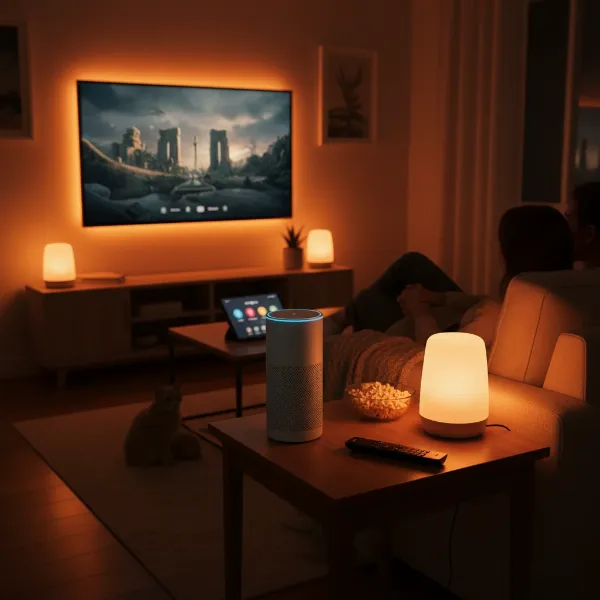 Smart speaker controlling a home theater setup for a movie night scene
Smart Home Security & Notifications
Security is a paramount concern for many homeowners, and IFTTT offers valuable integrations. You can set up Applets to arm or disarm your smart security cameras based on whether you’re entering or leaving a geofenced area around your home. For crucial alerts, IFTTT can send you a notification directly to your phone if an Alexa timer goes off, so you never miss an important reminder, even if you’re out of earshot of your speaker. Furthermore, integrating your smart doorbell with IFTTT can lead to actions like automatically pausing music or turning on hallway lights when motion is detected at your front door, providing both convenience and an extra layer of awareness.
Productivity & Communication
Beyond home automation, IFTTT extends your smart speaker’s reach into personal productivity and communication. With Google Assistant, you can enable an Applet to tweet a spoken message by saying “Hey Google, tweet $ [your message].” Similarly, Android users can send SMS messages via voice command. For professionals, IFTTT can log your work hours into a Google Sheet when you activate a specific voice command, streamlining your record-keeping. These integrations allow your voice assistant to handle more complex tasks, saving you time and effort in your daily routines.
Beyond the Basics: Advanced Tips and Considerations
While IFTTT offers incredible versatility, understanding its nuances and limitations is key to maximizing its potential with your smart speaker.
Customizing Your Applets
The real power of IFTTT comes from tailoring Applets to your specific needs. Don’t limit yourself to pre-made Applets; dive into creating your own. When setting up voice triggers, especially with Google Assistant, experiment with multiple, natural-sounding phrases. Consider using multi-step routines where one IFTTT Applet triggers another, or combines with native smart speaker routines, to create more sophisticated automations. For instance, an IFTTT Applet could detect high pollen count, which then triggers an Alexa routine to announce the warning and activate an air purifier.
Understanding IFTTT’s Evolution & Limitations
IFTTT has evolved over the years, including changes to its business model. While a free tier still exists, it typically limits users to a certain number of active Applets, with a subscription required for more. Be mindful of this when planning your automations. Additionally, understand that IFTTT relies on internet connectivity, so response times can vary and outages can temporarily disable your automations. Not every smart device or web service is compatible, so always check for IFTTT integration before committing to a new gadget. For highly critical or complex home automation, some users opt for more robust local solutions like Home Assistant, which offer greater control and less reliance on cloud services.
Table: Top Smart Speaker IFTTT Applet Ideas
| Applet Idea | Trigger (If This) | Action (Then That) | Smart Speaker |
|---|---|---|---|
| Find My Phone | “Hey Google/Alexa, find my phone” | Call my phone (VoIP) | Google Assistant/Alexa |
| Movie Night Scene | “Hey Google, activate movie night” | Dim lights, turn on TV, start streaming app | Google Assistant |
| Doorbell Silence | Ring doorbell pressed | Pause music on smart speaker | Alexa/Google Assistant |
| Weather Alert | Hourly pollen count exceeds X | Smart speaker announces alert | Alexa/Google Assistant |
| Geofence Lights | Arrive home | Turn on smart lights | Alexa/Google Assistant |
Expert Insights: Quotes for Your Smart Home Journey
“The true intelligence of a smart home isn’t just in individual devices, but in how seamlessly they work together. IFTTT provides that crucial link, making personalized automation accessible to everyone.” – Michael Chen, Smart Home Automation Specialist
Conclusion
Integrating IFTTT with your smart speaker is a powerful step towards a truly automated and personalized smart home. By understanding its “If This, Then That” logic and learning to connect it with your Google Assistant or Alexa devices, you unlock a world of possibilities that extend far beyond native capabilities. From enhancing daily convenience with voice-activated phone finding and weather alerts to creating sophisticated entertainment scenes and improving home security, IFTTT empowers you to craft a home that intuitively responds to your life. While there are considerations regarding evolving integration methods and subscription tiers, the ability to bridge disparate systems and customize your environment is invaluable. Start experimenting with Applets today, and you’ll soon discover the profound impact of a genuinely smart, interconnected home. What smart home automation will you create next?
Frequently Asked Questions
What exactly is an IFTTT Applet?
An IFTTT Applet is an automated routine that links a “trigger” from one service or device to an “action” in another. For example, “If the temperature drops below freezing (trigger), then send a notification to my phone (action).” They streamline tasks across different platforms.
Is IFTTT free to use with smart speakers?
IFTTT offers a free tier that allows users to create and enable a limited number of Applets, typically three. For more extensive automation needs or advanced features, IFTTT provides paid subscription plans.
Can IFTTT connect any smart device to my speaker?
IFTTT connects a vast array of smart devices and web services, but not every single one. Compatibility depends on whether the device or service has an IFTTT channel. Always check the IFTTT website for supported integrations before purchasing new hardware.
How does IFTTT differ for Alexa vs. Google Assistant?
Historically, Google Assistant offered more natural voice triggers. As of October 2023, Alexa’s native IFTTT integration was discontinued, requiring third-party services like Alexa Voice Monkey to connect IFTTT Applets to Alexa routines. Google Assistant integration remains more direct.
What if my IFTTT Applet isn’t working?
First, check your internet connection and ensure all linked services are properly authenticated in IFTTT. Verify the Applet’s trigger and action settings. For Alexa, confirm your third-party bridging service (e.g., Voice Monkey) and Alexa routine are correctly configured.
Can I use IFTTT to control music playback?
Yes, IFTTT can be used to control music playback on compatible Smart Speakers and music services. Examples include pausing music when a doorbell rings, starting a specific playlist at a certain time, or adjusting volume based on external events.
Are there privacy concerns with IFTTT?
As with any service that connects multiple accounts, privacy is a consideration. IFTTT requires access to linked services to function. It’s advisable to review IFTTT’s privacy policy and only connect services you trust, granting the minimum necessary permissions for your Applets to operate.