Have you ever asked Alexa a simple question, only for her to respond with an unsolicited “By the way, did you know…”? It’s a common experience for many Amazon Alexa users, transforming a helpful interaction into an intrusive marketing moment. While Amazon intends these “By the Way” suggestions to enhance your experience by introducing new features or skills, they often feel like interruptions, breaking the flow of your daily routine. The good news is, you’re not stuck with them. This comprehensive guide will walk you through the precise steps to quiet your Alexa and reclaim your peace, ensuring your smart speaker responds exactly how you want it to.
Understanding Alexa’s Proactive “By the Way” Suggestions
What Are “By the Way” Suggestions and Why Do They Occur?
|
Our Picks for the Best Smart Speaker in 2026
As an Amazon Associate I earn from qualifying purchases.
|
||
| Num | Product | Action |
|---|---|---|
| 1 | WiiM Sound Lite Smart Speaker, Hi‑Res 24‑bit/192 kHz, AI RoomFit™ Room Correction, 100W Peak, Wi‑Fi 6E/Bluetooth 5.3, Multi‑Room & Stereo Pairing, Black |

|
| 2 | Google Audio Bluetooth Speaker - Wireless Music Streaming, Powerful Sound, Assistant Built-in, Wi-Fi and Bluetooth Connectivity, Smart Home Control, Stereo Pairing - Chalk |
|
| 3 | Sonos Era 100 - White - Wireless, Alexa Enabled Smart Speaker |
|
| 4 | Mini Bluetooth Speaker, Smart Wireless Portable Speaker with Touchscreen, Loud HD Sound, LED Lights, BT5.4, All In One Small Audio for Home/Outdoor/Travel/Shower/Party/Beach/Camping/Hiking/Cycling |
|
| 5 | Belkin SOUNDFORM Elite Hi-Fi Smart Speaker + Wireless Charger (Alexa Voice-Controlled Bluetooth Speaker) Sound Technology By Devialet, Fast Wireless Charging for iPhone, Samsung Galaxy & More - White |
|
| 6 | Portable Bluetooth Speaker Valentines Gifts For Him: Powerful Crystal Clear Sound/Romantic Light/IPX5 Waterproof/All Day Playtime/BT 5.3/TWS Paring,Small Wireless Speaker for Outdoor-Travel-Date Night |
|
| 7 | aowoka Bluetooth Speaker, 2025 Portable Wireless Speakers with Led Light, Bluetooth 5.4, 24H Playtime, Enhanced Bass, IPX7 Waterproof, Outdoor Speaker for Travel, Sport, Party, Biking. |
|
| 8 | Bluetooth Speaker with HD Sound, Portable Wireless, IPX5 Waterproof, Up to 20H Playtime, TWS Pairing, BT5.3, for Home/Party/Outdoor/Beach, Electronic Gadgets, Birthday Gift (Black) |
|
| 9 | Bluetooth Speaker with HD Sound and Lights, Portable Wireless, Long-lasting battery life, TWS Pairing, for Home/Party/Outdoor/Travel/Beach, Stocking Stuffers, White Elephant Gifts for Adults (Black) |
|
| 10 | Sony SRS-XB100 Wireless Bluetooth Portable Lightweight Super-Compact Travel Speaker, Durable IP67 Waterproof & Dustproof Shower Speaker, 16 Hour Battery, Versatile Strap, & Hands-free Calling, Black |
|
“By the Way” suggestions are Alexa’s way of proactively offering additional information, features, or skills that she believes might be relevant to your recent command or general usage patterns. For instance, if you set a timer, Alexa might follow up with, “By the way, did you know you can also ask me to play relaxing sounds?” The underlying goal is to inform users about the vast capabilities of their device and encourage deeper engagement with the Alexa ecosystem. However, for many, these unexpected prompts quickly become a source of frustration, cluttering interactions and feeling akin to advertisements.
> “While intended to be helpful, unsolicited ‘By the Way’ suggestions can disrupt the user experience, transforming a seamless interaction into an unwanted commercial break.” – SmartSpeakerBox Admin, Smart Speaker Technician
The Evolution of Proactive Suggestions on Alexa
Over the years, Alexa has evolved from a simple voice assistant to a sophisticated smart home hub, constantly adding new features and functionalities. Alongside this growth, Amazon has developed various proactive features to highlight these capabilities. “By the Way” suggestions are a prime example, distinct from other proactive elements like “Hunches” (where Alexa anticipates your needs, like turning off lights if you leave the house). The increasing frequency and variety of these suggestions reflect Amazon’s ongoing effort to maximize user engagement and showcase the breadth of its platform.
Common Scenarios Triggering “By the Way” Suggestions
These prompts typically appear in specific contexts. You might hear a “By the Way” suggestion after issuing a basic command like checking the weather, setting an alarm, or asking for a fun fact. They can also pop up if Alexa detects a new feature related to your usage or tries to cross-promote services. For example, after playing music, Alexa might suggest a premium music service or a related skill. Understanding these triggers is the first step in effectively managing your Alexa experience.
The Direct Approach: Saying “Alexa, Stop By the Way”
The Simple Voice Command
The most direct and effective way to halt those persistent “By the Way” suggestions is remarkably simple: just tell Alexa to stop. When you hear one of these unwanted prompts, or at any other time, simply say:
“Alexa, stop by the way.”
Alternatively, you can try:
“Alexa, stop by the way suggestions.”
Your Alexa device should respond with a confirmation, typically something like, “Sure! I’ll avoid sending follow-up suggestions in the future.” This verbal command is designed to address the specific “By the Way” prompts directly, offering immediate relief from the interruptions.
 A person speaking to an Amazon Alexa device, with a speech bubble showing "Alexa, stop by the way."
Does It Permanently Disable Them?
Initially, there was some debate among users about the permanence of this command, with some reporting that Alexa would only “snooze” the suggestions temporarily. However, more recent information and user experiences suggest that for the specific “By the Way” follow-up prompts, this command generally disables them for good. Once you give the command, Alexa should cease providing those specific unsolicited follow-up tips. It’s important to note that this command primarily targets the “By the Way” suggestions and not necessarily all proactive prompts or notifications from Alexa, which might require additional adjustments in the Alexa app.
Beyond “By the Way”: Managing Other Unwanted Alexa Prompts
While the “stop by the way” command handles a significant annoyance, Alexa has other proactive features that might contribute to a chatty or intrusive experience. Fine-tuning these settings within the Alexa app can further customize your smart speaker to your preferences.
Customizing Your Alexa Voice Responses
For a generally quieter Alexa experience, beyond just stopping “By the Way” suggestions, you can adjust her voice responses.
- Brief Mode: This setting significantly reduces Alexa’s verbosity. Instead of lengthy confirmations like “Okay, turning off the living room lights,” Alexa will respond with a simple chime or a short “Okay.” To enable Brief Mode:
- Open the Alexa app.
- Tap More (or the three horizontal lines) at the bottom right.
- Go to Settings.
- Select Voice Responses.
- Toggle Brief Mode to on.
- Whisper Mode: If you often interact with Alexa in quiet environments, like late at night, you can enable Whisper Mode. When you whisper to Alexa, she will whisper back. This doesn’t reduce proactive suggestions but adds a layer of contextual politeness.
Controlling Proactive Features in the Alexa App
Several other settings within the Alexa app can be adjusted to minimize unsolicited advice and notifications.
- Hunches: Alexa’s Hunches feature allows her to proactively complete tasks based on your habits. For example, if you usually turn off the kitchen light after a certain time, Alexa might ask, “By the way, did you mean to turn off the kitchen light?” While potentially helpful, some users find it too intrusive. To manage Hunches:
- Open the Alexa app.
- Tap More > Settings.
- Select Hunches.
- Toggle the feature off if you don’t want Alexa anticipating your needs.
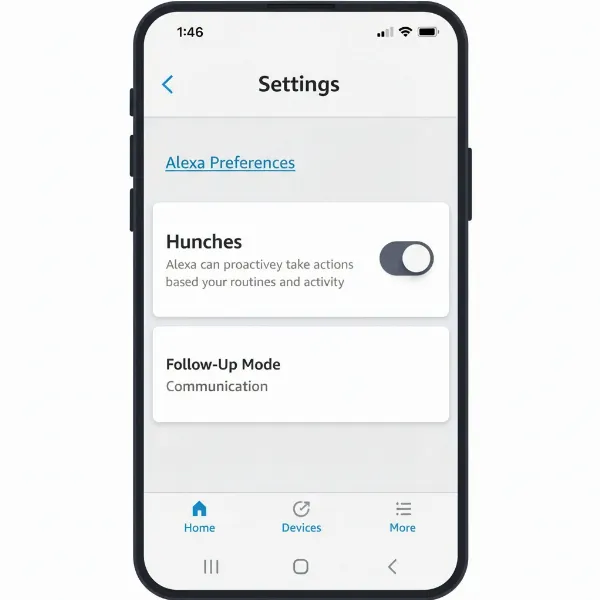 Screenshot of Alexa app settings for disabling Hunches.
- Suggested Skills & Content: Alexa uses your interaction data to suggest new skills, music, or other content. To stop these personalized recommendations:
- Open the Alexa app.
- Tap More > Settings.
- Go to Alexa Privacy.
- Select Manage Alexa Data.
- Look for options related to Suggested Skills & Content or Personalized Suggestions and disable them.
- “Things to Try” Notifications: These are notifications promoting new Alexa features or tips. To turn them off:
- Open the Alexa app.
- Tap More > Settings.
- Select Notifications.
- Scroll down and tap Things to Try.
- Toggle off Phone notifications to prevent these from appearing on your mobile device. You might also find in-app toggles.
- Amazon Shopping Notifications: If Alexa is constantly reminding you about deliveries or reorder suggestions, you can manage these:
- Open the Alexa app.
- Tap More > Settings.
- Select Notifications.
- Go to Amazon Shopping and toggle off any unwanted delivery or product notifications.
Reviewing and Adjusting Your Alexa Privacy Settings
Your privacy settings play a crucial role in how much data Alexa collects and uses to generate suggestions. Regularly reviewing these can give you greater control over your experience.
- Alexa App > More > Settings > Alexa Privacy: This section allows you to review voice history, manage permissions for skills, and adjust how your data is used for personalized experiences.
- Voice History: Periodically check your voice history to see if any unintended commands were recorded or misinterpreted, which might lead to unexpected suggestions. You can delete specific recordings or even set up automatic deletion.
Advanced Tips for a Tailored Alexa Interaction
For a truly customized and interruption-free Alexa experience, consider these additional strategies, especially if you own an Echo Show device.
Managing Echo Show Content Cards
Echo Show devices display various content cards on their screen, including news, weather, and often, suggestions for skills or features. These can be as intrusive visually as “By the Way” suggestions are audibly.
- On your Echo Show device, swipe down from the top of the screen and tap Settings.
- Tap Home Content.
- Here, you’ll see a list of various content cards. You can toggle off any card you don’t wish to see, such as “Things to Try,” “Reminders,” or “Discover.”
- Also, look for an option to turn off continuous rotation if you prefer a static home screen.
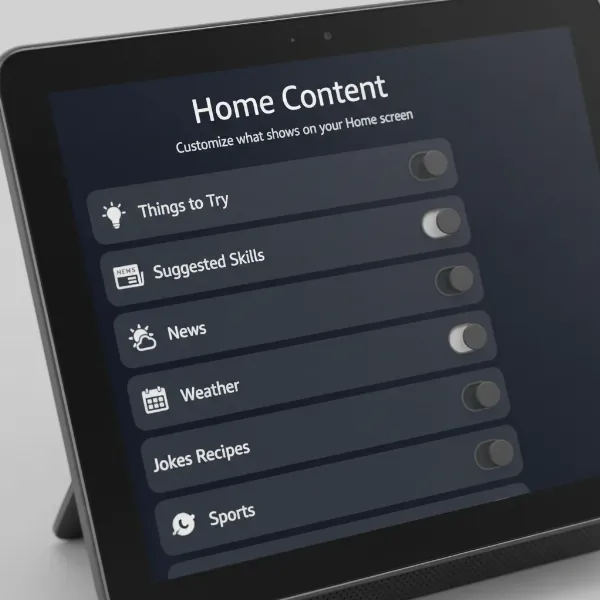 Screenshot of Echo Show home content settings to disable cards.
Creating Routines to Prevent Unwanted Prompts
Creative use of Alexa Routines can help minimize interruptions. While not directly disabling “By the Way” suggestions, routines can automate actions to preempt scenarios where suggestions might occur, or even to give a “stop by the way” command daily.
- Quiet Time Routine: Create a “Good Night” routine that, in addition to turning off lights, might include a custom command like “Alexa, turn off suggestions” (though the “stop by the way” is more specific for that particular prompt) or enables Do Not Disturb mode on your device.
- Morning Briefing: Design a routine that provides exactly the information you want (weather, news headlines) without extra prompts.
The Importance of Regular Updates and Settings Checks
Amazon frequently updates Alexa’s features and capabilities. This means that new proactive suggestions or notification categories can be introduced over time. To maintain your desired level of quiet and control, it’s a good practice to:
- Periodically check the Alexa app’s settings, especially the “Notifications” and “Alexa Privacy” sections, for any new options that might have appeared.
- Ensure your Alexa device software is up to date, as updates can sometimes include new ways to manage these features more effectively.
Table: Quick Guide to Managing Alexa’s Proactive Features
| Feature | What it Does | How to Manage/Disable |
|---|---|---|
| “By the Way” Suggestions | Unsolicited follow-up prompts after commands. | Say “Alexa, stop by the way” or “Alexa, stop by the way suggestions.” |
| Brief Mode | Shorter, less verbose Alexa responses. | Alexa App > More > Settings > Voice Responses > Toggle Brief Mode ON. |
| Hunches | Proactive suggestions based on smart home habits. | Alexa App > More > Settings > Hunches > Toggle OFF. |
| Suggested Skills & Content | Personalized skill and content recommendations. | Alexa App > More > Settings > Alexa Privacy > Manage Alexa Data > Toggle off personalized suggestions. |
| “Things to Try” Notifications | Alerts about new Alexa features, skills, or tips. | Alexa App > More > Settings > Notifications > Things to Try > Toggle off Phone notifications. |
| Echo Show Home Content Cards | Rotating display cards with news, tips, suggestions. | On Echo Show: Swipe down > Settings > Home Content > Toggle off unwanted cards (e.g., “Things to Try,” “Suggested Skills”). |
Conclusion
Taking control of Alexa’s “By the Way” suggestions and other proactive prompts is key to transforming your Smart Speaker from an intrusive device into a truly personalized assistant. By employing a simple voice command, adjusting key settings within the Alexa app, and proactively managing your Echo Show’s display, you can significantly reduce unwanted chatter. The journey to a quieter, more efficient Alexa experience is within your grasp, allowing you to enjoy the convenience of smart technology without the constant interruptions. Will you take the step today to refine your Alexa’s responses and create the calm, controlled smart home you truly desire?
Frequently Asked Questions
What does “Alexa, stop by the way” do?
Saying “Alexa, stop by the way” instructs your Amazon Echo device to cease giving unsolicited follow-up suggestions that begin with “By the way…” after you issue a command. This command is generally effective in disabling these specific prompts for good, leading to a quieter interaction.
Why does Alexa keep giving me suggestions?
Alexa gives suggestions to inform users about new features, skills, or services, aiming to enhance engagement with the device and the broader Amazon ecosystem. These are often based on your usage patterns, the context of your commands, or new additions to Alexa’s capabilities.
Can I turn off all Alexa’s proactive suggestions?
While you can disable the “By the Way” prompts with a voice command, turning off all proactive suggestions requires a multi-faceted approach. This involves adjusting various settings in the Alexa app, such as Brief Mode, Hunches, Suggested Skills & Content, and specific notification types, to fully customize your experience.
How do I make Alexa less talkative?
To make Alexa less talkative, enable “Brief Mode” in the Alexa app under Voice Responses. This reduces her verbal confirmations to short chimes or brief acknowledgments. Additionally, disabling “By the Way” suggestions and other proactive prompts will contribute to a much quieter interaction.
Where can I find Alexa privacy settings?
Alexa’s privacy settings are located within the Alexa app. Navigate to “More” (or the three horizontal lines menu) > “Settings” > “Alexa Privacy.” Here, you can review your voice history, manage permissions, and control how your data is used for personalized experiences and suggestions.
Do “By the Way” suggestions collect my data?
Alexa’s “By the Way” suggestions are based on your usage data and interactions. While disabling them stops the prompts, it doesn’t necessarily stop all data collection. You can manage data collection and personalize suggestions through the “Alexa Privacy” section of the Alexa app.
Will turning off suggestions affect Alexa’s core functions?
No, turning off “By the Way” suggestions or other proactive prompts will not affect Alexa’s core functions. You will still be able to use your device for commands like setting alarms, playing music, controlling smart home devices, and answering questions. These settings only aim to reduce unsolicited verbal output.