Welcome to the future, and guess what? It’s a lot cozier and more convenient than you might think. If you’ve been wondering how to setup a smart home, you’ve probably pictured complex wiring and a budget bigger than your mortgage. Let’s put that idea to rest. Setting up a smart home in today’s world is incredibly accessible, fun, and can genuinely make your daily life a little bit easier. Think of it less as a complicated tech project and more like teaching your home a few new, helpful tricks. This guide is your friendly starting point, designed to walk you through the process, one simple step at a time, turning your house into a helpful, intuitive home.
What’s the Big Deal with a Smart Home Anyway?
A smart home is essentially a home equipped with lighting, heating, and electronic devices that can be controlled remotely by phone or computer. The real magic, however, happens when you introduce a central brain to orchestrate everything—and that’s where a smart speaker comes in.
Imagine this: You walk in the door, arms full of groceries. Instead of fumbling for the light switch, you just say, “Hey Aura, I’m home.” Instantly, the hallway lights turn on, your favorite evening playlist starts to play softly, and the thermostat adjusts to your preferred temperature. This isn’t science fiction; this is the simple convenience that a well-configured smart home offers. It’s about creating an environment that responds to you, anticipating your needs and taking care of the little things so you can focus on what matters.
The Heart of Your New Smart Home: The Smart Speaker
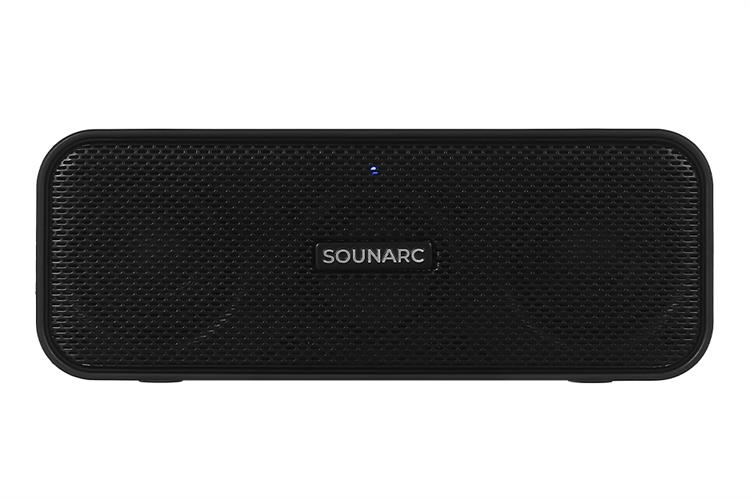
Think of a smart speaker, like our Smart Speaker Box, as the friendly conductor of your home’s orchestra. It’s the central hub that listens to your requests and tells all your other smart devices what to do. Without it, you’d be stuck managing a dozen different apps on your phone, which kind of defeats the purpose of convenience.
So, how does it work? It’s a blend of a few clever technologies:
- Voice Recognition: Sophisticated microphones listen for a “wake word” (like “Hey Aura”). Once it hears that, it starts listening for your command.
- Artificial Intelligence (AI): The device sends your command to powerful computers in the cloud. The AI figures out what you mean, whether you’re asking for a song, the weather forecast, or to dim the lights.
- Connectivity: It then sends the right command back to the corresponding device in your home—your smart bulb, your thermostat, your TV—over your Wi-Fi network. All of this happens in the blink of an eye.
Getting Started: Your Step-by-Step Plan for How to Setup a Smart Home
Feeling ready to dive in? Great! The journey of a thousand smart devices begins with a single step. Here’s a simple, no-fuss plan to get you started.
Step 1: Choose Your “Team” or Ecosystem
Before you buy anything, you need to pick a team. The smart home world is dominated by three major players: Amazon (with Alexa), Google (with Google Assistant), and Apple (with HomeKit/Siri). Your smart speaker determines which ecosystem you’re building in.
- Amazon Alexa: The most popular and compatible with the widest range of smart devices. If you want endless choices for gadgets, Alexa is a fantastic pick.
- Google Assistant: Known for its powerful search capabilities and understanding natural language. If you’re already deep in the Google ecosystem (Gmail, Android, etc.), this feels like a natural extension.
- Apple HomeKit: The go-to for Apple enthusiasts. It’s renowned for its strong focus on security and privacy, but it supports a smaller, more curated list of devices.
My advice? Don’t overthink it. They all do a fantastic job. Pick the one that feels most familiar to you.
Step 2: Start Small with Your First Device
You don’t need to automate your entire house overnight. The best way to learn how to setup a smart home is to start with one or two simple, high-impact devices.
- Smart Plugs: These are the unsung heroes of the smart home. You can plug anything into them—a lamp, a coffee maker, a fan—and instantly make it smart. You can turn them on or off with your voice or set a schedule. It’s a perfect, low-cost starting point.
- Smart Light Bulbs: Swapping a regular bulb for a smart one is another game-changer. You can dim the lights for movie night, change their color to match your mood, or schedule them to turn on right before you get home, all with a simple voice command.
Step 3: The Setup Process (It’s Easier Than You Think)
Once you have your smart speaker and your first device, it’s time to connect them.
- Power Up: Plug in your smart speaker and your smart device (e.g., screw in the light bulb or plug in the smart plug).
- Download the Apps: You’ll need two apps on your phone to start: the app for your smart speaker (like the AuraVoice or Alexa app) and the app for your smart device (e.g., the Philips Hue or TP-Link Kasa app).
- Connect to Wi-Fi: Follow the instructions in each app to connect both the speaker and the device to your home’s Wi-Fi network. This is usually a very straightforward process.
- Link the Services: This is the key step. Open your smart speaker’s app. Look for a section called “Skills” (on Alexa) or “Works with Google.” Search for the brand of your smart device and “link” your accounts. This gives your speaker permission to control your device.
- Start Commanding! Once linked, you can start using your voice. Try something simple like, “Hey Aura, turn on the living room lamp.”
“The true goal of a smart home isn’t about having futuristic gadgets; it’s about removing friction from your daily life. Start with a problem you want to solve—like not wanting to get out of bed to turn off the lights—and you’ll immediately see the value.” – Dr. Evelyn Reed, Human-Computer Interaction Specialist.
Beyond the Basics: Making Your Home Truly Smart
Once you’ve mastered the basics, the real fun begins. It’s time to move beyond simple commands and create “routines” or “scenes.” These are custom commands that trigger a sequence of actions across multiple devices.
For example, you could create a “Good Morning” routine:
- Trigger: “Hey Aura, good morning.”
- Actions:
- The bedroom lights slowly fade on.
- The smart plug in the kitchen turns on the coffee maker.
- The speaker tells you about today’s weather and your first calendar appointment.
- Your favorite morning news podcast starts playing.
This is where your smart home transitions from a cool novelty into a genuinely helpful assistant that streamlines your day. Explore the “Routines” section of your speaker’s app and get creative.
What About Privacy and Security?
This is a question on everyone’s mind, and it’s an important one. The idea of an always-on microphone in your home can feel a bit strange. Here’s what you need to know to stay secure:
- They Aren’t Recording Everything: Smart speakers are designed to only listen for their “wake word.” They don’t record or send any data to the cloud until they hear it. Most speakers also have a physical mute button that electronically disconnects the microphone for peace of mind.
- Secure Your Accounts: Your smart home is only as secure as your passwords. Use a strong, unique password for your Wi-Fi network and for the accounts associated with your smart home apps. Enable two-factor authentication whenever it’s offered.
- Manage Your Data: Companies like Amazon and Google allow you to review and delete your voice recording history. It’s a good practice to check these settings periodically and clear your history if you prefer.
Frequently Asked Questions (FAQ)
Q: Do I need a special hub to setup a smart home?
A: Not necessarily anymore. Many modern smart devices can connect directly to your Wi-Fi. Your smart speaker (like an Amazon Echo or Google Nest Hub) acts as the central “hub” for controlling everything with your voice, eliminating the need for extra hardware in most beginner setups.
Q: How much does it cost to start a smart home?
A: You can start for less than a hundred dollars. A good smart speaker and a couple of smart plugs or bulbs are all you need to begin experiencing the benefits. From there, you can expand at your own pace and budget.
Q: Can I mix and match smart device brands?
A: Yes, absolutely! As long as the devices are compatible with your chosen voice assistant (look for the “Works with Alexa” or “Works with Google Assistant” logo on the box), you can mix brands freely.
Q: Is my Wi-Fi good enough for a smart home?
A: For most small to medium setups, a standard, modern router is perfectly fine. If you live in a large house or notice that some devices have a weak connection, you might consider upgrading to a mesh Wi-Fi system to ensure strong coverage everywhere.
Q: What is the single easiest smart device to start with?
A: A smart plug. There’s virtually no installation. You just plug it into the wall, plug a regular device into it, and complete a quick setup on your phone. It’s a fantastic and low-risk way to get your first taste of home automation.
Your Smart Home Journey Awaits
Building a smart home is a marathon, not a sprint. It’s an enjoyable and rewarding process of discovering what works best for you and your lifestyle. Start with solving one small inconvenience, and you’ll quickly see the possibilities unfold. The goal isn’t just to fill your house with technology, but to create a space that is more comfortable, efficient, and responsive to your needs. Now that you know how to setup a smart home, the only question left is: what will you automate first? We’d love to hear about your plans and experiences in the comments below.