Ever walked into a dark house, fumbling for the light switch, and wished your home just… knew you were there? Finding the right Apple Homekit Speakers can turn that wish into reality. These aren’t just gadgets for blasting your favorite tunes; they are the heart and soul of a truly intelligent, intuitive home. They act as the conductor for your smart home orchestra, allowing you to control everything from lights to thermostats with the simple power of your voice. Let’s dive into how these devices can transform your daily life from a series of tasks into a seamless experience.
What Exactly Are Apple HomeKit Speakers Anyway?
At its core, an Apple HomeKit speaker is a high-quality audio device integrated with Siri and Apple’s smart home platform, HomeKit. This integration allows it to do much more than just play music. It becomes a central hub, listening for your commands and communicating with other HomeKit-compatible devices in your home.
Think of it this way: a regular Bluetooth speaker is like a pair of headphones for your room—it plays sound. A HomeKit speaker, on the other hand, is like a personal assistant who also happens to be a fantastic DJ. It listens, understands context, and acts on your behalf, creating a responsive and connected environment. It’s the bridge between you and your smart home ecosystem.
How Do These Smart Gadgets Actually Work Their Magic?
It might seem like magic when you say, “Hey Siri, good morning,” and your lights slowly brighten, the coffee maker starts brewing, and a soft playlist begins to play. But behind the curtain, it’s a symphony of sophisticated technology working in perfect harmony.
The Brains: Siri and Artificial Intelligence
The process starts with your voice. Microphones inside the speaker are always listening for the “Hey Siri” wake phrase. Once activated, the speaker records your command and sends it to Apple’s secure servers for processing. This is where advanced natural language processing (NLP) kicks in. The AI deciphers your request—whether you’re asking a question, wanting to play a song, or controlling a smart plug—and sends the appropriate command back to the speaker or directly to the relevant device on your network.
The Connection: Wi-Fi, Bluetooth, and Thread
For this communication to happen, your speaker needs a robust connection. Most Apple HomeKit speakers use Wi-Fi to connect to the internet and your home network. This allows them to stream high-fidelity audio and communicate with your other smart devices. Some also utilize Bluetooth for initial setup or direct connections. More advanced models, like the HomePod and HomePod mini, also support Thread, a low-power mesh networking technology designed specifically for smart home devices. Thread creates a more reliable and responsive network, eliminating the lag you sometimes get with other systems.
The Real Perks: More Than Just a Pretty Speaker
So, what can you actually do with one of these? The possibilities are vast and can be tailored to your specific lifestyle.
- Immersive, High-Fidelity Audio: First and foremost, these are excellent speakers. Whether you’re listening to a podcast while cooking or setting up a multi-room audio system with AirPlay 2 for a party, the sound quality is often a major focus.
- The Ultimate Smart Home Hub: This is the real game-changer. Your speaker acts as a Home Hub, allowing you to control your HomeKit accessories even when you’re not home. Forgot to turn off the lights? Just ask Siri on your iPhone to do it for you, and the command is relayed through your speaker.
- A Hands-Free Personal Assistant: Need to set a timer, check the weather, get a sports score, or add milk to your shopping list? Siri is there to help. It can even make calls, send messages, and find your lost iPhone for you.
- Personalized for Everyone: With voice recognition, the speaker can distinguish between different people in your household. When you ask, “What’s on my calendar?” it will access your calendar, not your partner’s. This makes the experience feel truly personal and tailored.
Your Guide to Choosing the Best Apple HomeKit Speakers
Navigating the options can feel overwhelming, but it really boils down to your priorities: are you an audiophile, a smart home enthusiast, or somewhere in between?
The Apple Natives: HomePod and HomePod mini
For the purest Apple experience, the HomePod and HomePod mini are the go-to choices.
- HomePod (2nd generation): This is Apple’s flagship speaker, designed for those who prioritize audio quality. It uses computational audio to adapt its sound to the room’s acoustics, delivering rich, deep bass and crisp highs. It’s a powerhouse that can easily fill a large room with immersive sound. It also packs in a temperature and humidity sensor and acts as a Thread border router.
- HomePod mini: Don’t let its size fool you. The HomePod mini delivers impressive 360-degree sound that is surprisingly robust for its small footprint. It’s perfect for smaller spaces like bedrooms or kitchens and is much more affordable. You can pair two for a stereo experience, and it also functions as a full-fledged Home Hub and Thread border router.
| Feature | HomePod (2nd Gen) | HomePod mini |
|---|---|---|
| Primary Focus | High-fidelity audio | Smart home control & great sound |
| Sound Technology | Computational audio, room sensing | 360-degree computational audio |
| Smart Home Hub | Yes (Wi-Fi, Thread, Bluetooth 5.0) | Yes (Wi-Fi, Thread, Bluetooth 5.0) |
| Sensors | Temperature & Humidity | Temperature & Humidity |
| Best For | Living rooms, dedicated listening spaces | Bedrooms, kitchens, offices, stereo pairs |
| Price Point | Premium | Budget-friendly |
The Third-Party Contenders: Sonos, Bose, and More
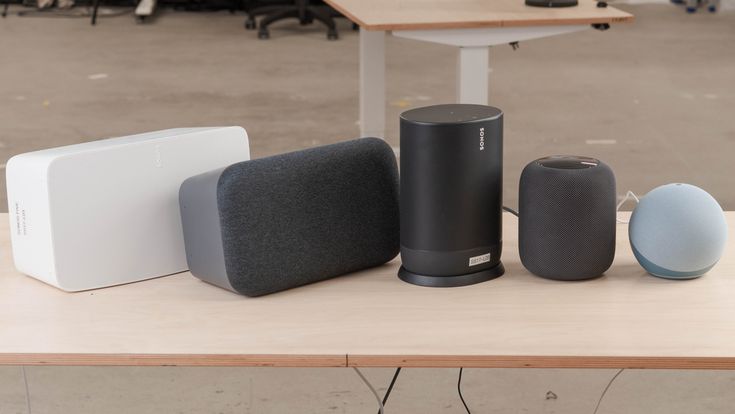
While Apple’s own speakers offer the tightest integration, they aren’t the only option. Thanks to AirPlay 2, Apple’s streaming technology, many third-party speakers can be seamlessly integrated into your Apple ecosystem. Brands like Sonos, Bose, and Belkin offer speakers that support AirPlay 2. While you might not be able to talk directly to Siri on all of them (some exceptions exist, like the Sonos One), you can easily stream audio from any Apple device and group them with your HomePods for multi-room playback.
Sound Quality vs. Smart Features: What’s Your Priority?
This is the key question. If your number one goal is breathtaking, room-filling sound for your music collection, the full-size HomePod is likely your best bet. If you’re more focused on dotting your home with affordable smart control points and enjoy good background music, a few HomePod minis would be a fantastic choice. If you’re already invested in another audio ecosystem like Sonos, choosing an AirPlay 2-compatible model is a great way to bridge the two worlds.
Pro Tips to Get the Most Out of Your Speaker
Once you’ve unboxed your new speaker, here are a few things you can do to unlock its full potential:
- Create Scenes: Bundle multiple actions into a single command. A “Movie Night” scene could dim the lights, lower the blinds, and turn on the TV. You can activate it by saying, “Hey Siri, it’s movie night.”
- Set Up Automations: Make your home truly proactive. Create an automation so that when the first person arrives home after 5 PM, the entryway lights turn on and your “Welcome Home” playlist starts playing.
- Use the Intercom: You can send audio messages from one HomePod to another, or to everyone’s Apple devices. It’s a much nicer way to announce that dinner is ready than shouting through the house.
- Handoff Audio: If you’re listening to a song or podcast on your iPhone, you can simply bring your phone near the top of a HomePod or HomePod mini to seamlessly transfer the audio.
Let’s Talk Privacy: Is Siri Always Listening?
This is a valid and important question in today’s world. Apple has built its ecosystem with privacy at its core. Your speaker is only listening locally for the “Hey Siri” phrase. No audio is sent to Apple’s servers until after it hears that phrase. Even then, the audio is sent anonymously and is not tied to your Apple ID.
As digital privacy analyst Dr. Evelyn Reed notes, “Apple’s on-device processing and commitment to anonymized server requests set a high standard for privacy in the smart speaker market. Users can feel confident that their private conversations are remaining private.”
You have full control over your Siri history and can delete it at any time. This focus on security is a key reason many people choose to build their smart home around the Apple ecosystem.
Frequently Asked Questions (FAQ)
Q: Can I use Apple HomeKit speakers with an Android phone?
A: Not really. Apple HomeKit speakers are designed to work within the Apple ecosystem. While some AirPlay 2 speakers may have separate Android apps for control, you will miss out on Siri, HomeKit integration, and other core features.
Q: Do I need an Apple Music subscription?
A: No. While Apple Music is the most seamlessly integrated service, you can use AirPlay to stream audio from virtually any app on your iPhone or Mac, including Spotify, YouTube Music, and Pandora.
Q: Can I use a single HomePod mini to control my whole house?
A: Yes. A single HomePod or HomePod mini can act as a Home Hub, allowing you to control all your HomeKit devices. Having multiple speakers simply provides more convenient voice control points and enables features like Intercom and multi-room audio.
Q: Are third-party AirPlay 2 speakers as good as a HomePod?
A: It depends. Some, like the Sonos One, offer fantastic sound and their own set of features. However, they will not offer the deep Siri integration, Handoff feature, or personal request capabilities that a HomePod does. They are a great supplement to a HomeKit setup, but a HomePod is the best central brain.
Q: Do Apple HomeKit speakers work as a speakerphone?
A: Yes! You can make and receive phone calls directly on your HomePod. You can ask Siri to call someone, or you can transfer a call from your iPhone to the speaker for a hands-free conversation.
The Final Note
Choosing the right Apple HomeKit speakers is about more than just buying a new piece of tech; it’s about investing in a more convenient, secure, and enjoyable way of life. From the rich sound that fills your room to the simple command that secures your home for the night, these devices serve as a reliable partner in your daily routine. They are a powerful demonstration of how technology, when designed with the user in mind, can truly feel like magic. What will be the first thing you ask Siri to do?